How to Choose a URL Shortener in 2026

URL shorteners have come a long way since their early days as simple tools that turned long addresses into short ones. In 2026, the best link shorteners are full-fledged link management platforms that offer analytics, smart routing, team collaboration, and deep integrations with your marketing stack. With so many options on the market, picking the right one can feel overwhelming.
This guide breaks down the key criteria you should evaluate before committing to a platform, compares the major players side by side, and helps you understand which features actually matter for your use case.
Smart Routing and Conditional Redirects
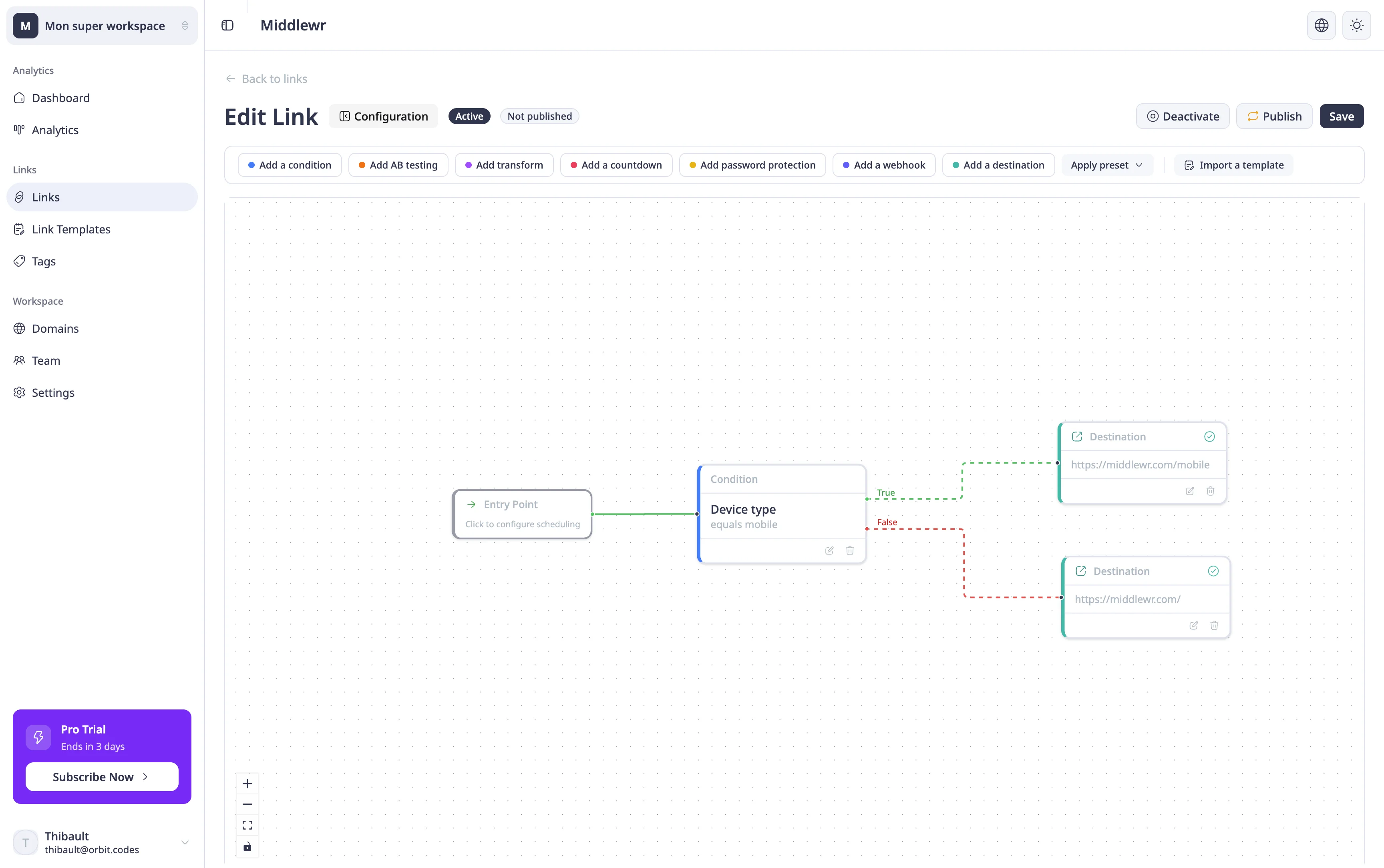
If there is one feature that separates a modern link management platform from a basic shortener, it is smart routing. Smart routing lets you redirect visitors to different destinations based on conditions you define — device type, country, browser language, time of day, or even custom HTTP headers.
Why does this matter? Consider a global product launch. You want mobile users in Germany to land on your German App Store page, desktop users in the US to see your English landing page, and everyone else to hit a universal fallback. Without smart routing, you would need to create separate links for each segment and manage them individually across every campaign.
The depth of smart routing varies widely across tools. Some offer basic device or country targeting through a simple dropdown. Others, like Middlewr, provide a visual rule graph editor where you build complex, multi-path routing logic by connecting condition nodes, split nodes, and destination nodes on a canvas. This approach makes it easy to visualize your entire redirect flow at a glance and to iterate on it without writing code. If conditional routing is important to your workflow, check out our guide to setting up smart redirects for a hands-on walkthrough.
Analytics and Click Tracking
Every URL shortener offers some form of click tracking, but the depth and usefulness of the analytics dashboard can vary dramatically. At a minimum, you should expect total click counts and a timeline view. Beyond that, look for geographic breakdowns by country and city, device and browser distribution, referrer data showing where your traffic comes from, and the ability to filter by date range.
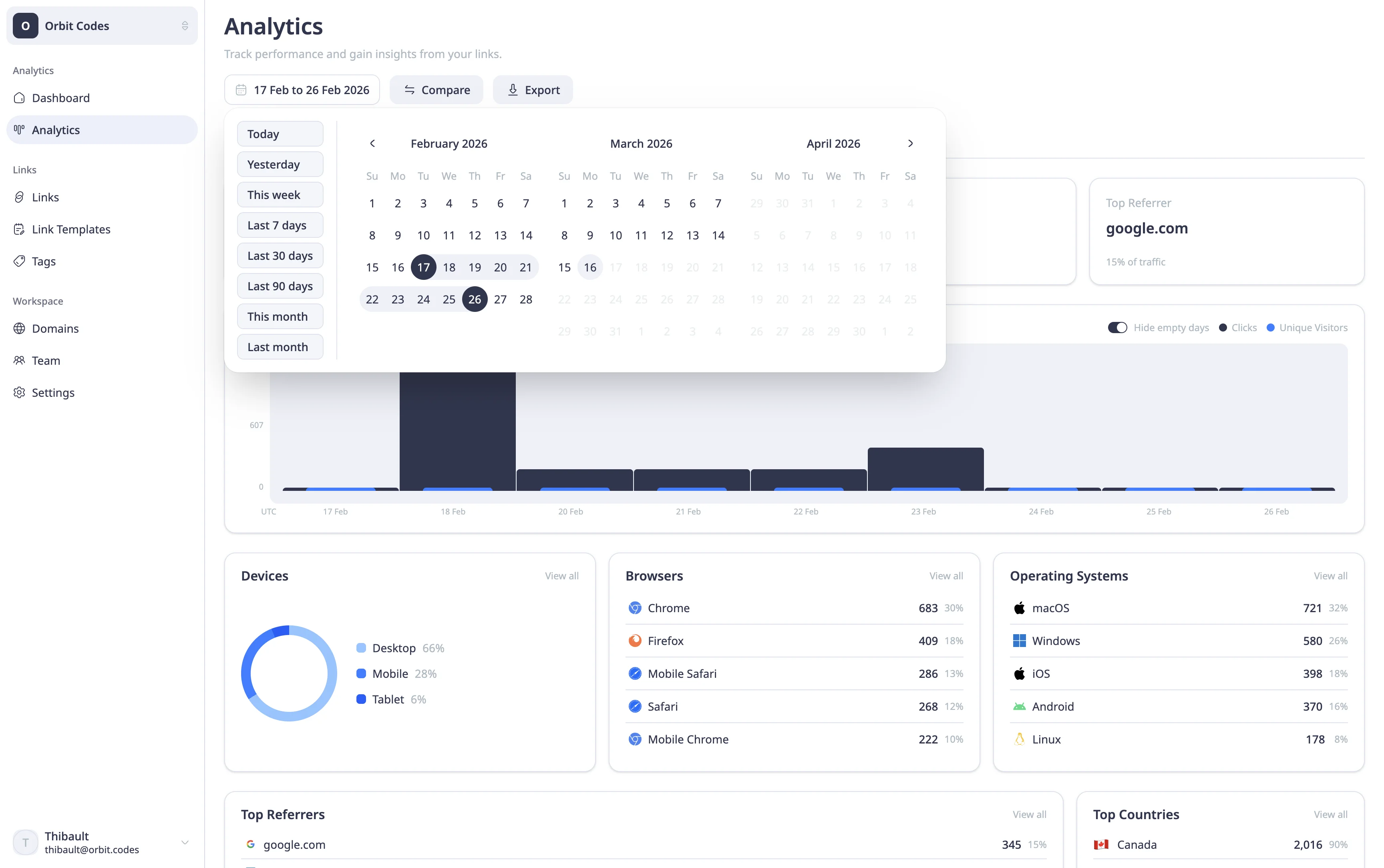
More advanced platforms provide real-time dashboards, exportable reports, and UTM parameter tracking so you can tie short link performance back to specific campaigns. If you rely on data to make marketing decisions — and in 2026, you should — analytics quality is non-negotiable.
Some tools gate their best analytics features behind premium tiers. Before you commit, check whether the free plan gives you enough visibility to be useful, or whether you will hit a paywall the moment you need geographic data or referrer breakdowns. For a deeper look at what a robust analytics setup looks like, see our analytics dashboard guide.
Custom Domains
Using a custom domain for your short links — like go.yourcompany.com instead of a generic shortener domain — does three things. First, it builds brand recognition: every link you share reinforces your company name. Second, it builds trust: recipients are more likely to click a link that clearly belongs to a brand they recognize. Third, it improves deliverability: emails and messages containing branded links are less likely to be flagged as spam.
Most serious URL shorteners support custom domains, but the setup experience and limits vary. Some charge extra for each additional domain, some limit you to one domain on lower plans, and others include unlimited custom domains across all tiers. Check whether the platform handles SSL certificate provisioning automatically and whether DNS setup is straightforward. If you are evaluating this feature, our custom domain setup tutorial walks through the process step by step.
QR Codes
QR codes have seen a resurgence in recent years, driven by contactless experiences and offline-to-online marketing. A good URL shortener should let you generate a QR code for any short link with minimal effort.
Beyond basic generation, look for customization options. Can you add your logo to the center of the QR code? Can you change the foreground and background colors to match your brand? Can you download in multiple formats (SVG, PNG) and at different resolutions? These details matter when you are placing QR codes on printed materials, packaging, or event signage.
Some platforms treat QR codes as an afterthought — a plain black-and-white square with no branding options. Others offer a full QR code editor with style presets. If QR codes are part of your marketing mix, the difference is significant. For more on this topic, see our QR code generation guide.
Team Collaboration
If you are working solo, any tool will do. But the moment your team grows beyond one person, you need proper collaboration features. Look for workspaces that let you organize links by project or client, role-based permissions so you can control who can create, edit, or delete links, and audit trails that show who changed what and when.
Some platforms offer shared workspaces but lack proper role-based permissions — everyone is an admin, or the only distinction is between "viewer" and "editor." For agencies and larger marketing teams, this is not enough. You need the ability to invite team members with specific roles, restrict access to billing, and ensure that a new intern cannot accidentally delete your highest-traffic campaign link.
Middlewr, for example, uses a role-based access system with predefined roles (Viewer, Editor, Admin) that lets workspace owners control exactly what each team member can do. If team management is central to your workflow, our team invitation guide shows how to get started.
API and Integrations
For developers and teams that integrate link management into their existing workflows, API access is essential. A well-documented REST API lets you create, update, and delete links programmatically, retrieve analytics data, and automate bulk operations like CSV imports.
Look for comprehensive API documentation, reasonable rate limits, and support for webhooks so your systems can react to events in real time. Some platforms also offer SDKs or official integrations with popular tools like Zapier, Slack, or marketing automation platforms.
If your use case involves programmatic link creation — for example, generating a unique short link for every email in a campaign — the quality and reliability of the API will matter more than any other feature. To learn how to set up API access, see our API key management guide.
Pricing and Value
Pricing models in the URL shortener space range from generous free tiers to enterprise plans costing hundreds of dollars per month. The right plan depends on your volume (number of links and clicks), the features you need, and how many team members will use the platform.
When comparing plans, pay attention to what is included in the free tier. Some platforms offer a genuinely useful free plan with enough links, clicks, and features to get started. Others use the free plan as a demo that becomes impractical the moment you try to do anything real — limiting you to a handful of links or stripping out analytics entirely.
Also watch for per-click pricing models. If your links receive significant traffic, a platform that charges per click can become expensive quickly. Flat-rate plans with generous or unlimited click allowances tend to be more predictable and budget-friendly. Consider your growth trajectory: a tool that seems cheap today but charges steeply for additional seats or features may cost more in the long run than a platform with a higher base price but more inclusive plans.
Security Features
Security is often overlooked when choosing a URL shortener, but it matters — especially if you are sharing links to sensitive content like internal documents, gated offers, or pre-release pages.
Look for password protection, which lets you require visitors to enter a password before being redirected. Link expiration is another useful feature: you can set a date after which the link stops working, ensuring that time-sensitive content does not remain accessible indefinitely. Some platforms also offer link cloaking, click fraud detection, and the ability to disable a link instantly if it is being misused.
If security is a priority, check whether these features are available on your plan or locked behind a premium tier. For a walkthrough of link-level security, see our password protection guide.
Feature Comparison
The table below compares six popular URL shorteners across the criteria discussed above. Use it as a starting point for your evaluation.
| Feature | Middlewr | Dub.co | Bitly | Short.io | Rebrandly | TinyURL |
|---|---|---|---|---|---|---|
| Smart Routing | Advanced | Limited | ✗ | Limited | ✗ | ✗ |
| Analytics | ✓ | ✓ | ✓ | ✓ | ✓ | Basic |
| Custom Domains | ✓ | ✓ | ✓ | ✓ | ✓ | ✗ (paid) |
| QR Codes | Customizable | Basic | Basic | ✓ | Basic | ✗ |
| Team Features | ✓ | Limited | ✓ | Limited | ✓ | ✗ |
| API | ✓ | ✓ | ✓ | ✓ | ✓ | Limited |
| Free Plan | Generous | ✓ | Limited | ✓ | Limited | ✓ |
A few things stand out. Smart routing — the ability to conditionally redirect users based on device, location, or other attributes — remains a rare feature. Most platforms either do not offer it at all or provide only basic targeting options. Middlewr is the only tool in this comparison with an advanced visual rule graph editor for building complex routing logic.
On the analytics front, most platforms perform well, though the depth of data and the accessibility of dashboards vary. QR code customization is another area of differentiation: if you need branded QR codes with logo embedding and color control, check whether your chosen platform supports it or only generates plain codes.
Free plan generosity also varies widely. Some platforms offer enough on the free tier to support a small business or side project. Others restrict the free plan so heavily that it is effectively a trial.
Making the Right Choice
Choosing a URL shortener ultimately comes down to understanding your own needs. If you simply need to shorten a link and share it, almost any tool will work. But if you are managing links at scale, running campaigns across multiple regions, or coordinating a team, the platform you choose will have a real impact on your workflow and results.
Start by identifying which of the criteria above are most important to your use case. If smart routing is central to your marketing strategy — for example, if you run campaigns targeting multiple countries or devices — prioritize tools that offer robust conditional routing. If analytics depth is your primary concern, compare dashboards side by side. If budget is tight, map out the total cost at your expected volume, not just the sticker price of the plan.
For marketing teams that need advanced routing, detailed analytics, team workspaces, and a developer-friendly API, Middlewr offers a comprehensive solution that covers all of these bases. But regardless of which platform you choose, the most important step is to move beyond basic link shortening and take advantage of the link management capabilities that modern tools provide.