Middlewr vs Bitly: Which Link Shortener Is Right for You?

Bitly is the name most people think of when they hear "link shortener." It has been around since 2008 and has built a massive user base. But the link management space has evolved dramatically since then. New platforms like Middlewr offer capabilities that simply did not exist a decade ago — conditional routing, visual rule editors, A/B testing, and modern developer-friendly APIs. If you are evaluating link shorteners in 2026, you owe it to yourself to look beyond the default choice.
This article provides a factual, side-by-side comparison of Middlewr and Bitly so you can decide which platform fits your needs.
At a Glance
Bitly is a well-established URL shortener known for simple link creation and basic analytics. It serves millions of users and is deeply embedded in many marketing workflows. Its strength lies in brand recognition and a proven track record.
Middlewr is a modern link management platform built for teams and marketers who need more than a short URL. It provides a visual rule graph editor for conditional routing, built-in A/B testing, customizable QR codes, link templates, CSV import/export, and a workspace-based collaboration model — all wrapped in a clean, modern interface.
Feature Comparison
| Feature | Middlewr | Bitly |
|---|---|---|
| Conditional routing | Visual rule graph editor with 8 node types | Not available |
| A/B testing | Built-in split routing with weighted variants | Not available |
| Analytics | Detailed dashboard with device, country, referrer data | Basic click analytics |
| Custom domains | Fully supported | Supported (paid plans) |
| QR codes | Customizable colors, logos, and styles | Basic QR generation |
| Link templates | Reusable templates for consistent link creation | Not available |
| API | Full REST API with oRPC contracts | REST API available |
| Team collaboration | Workspaces with role-based access (Viewer, Editor, Admin) | Available on higher-tier plans |
| CSV import/export | Built-in | Limited |
| UTM tracking | Built-in UTM builder | Available |
| Webhooks | Supported via rule graph | Not available |
| Free plan | Full feature set included | Very limited (recently reduced) |
| Pricing | Competitive | Expensive at scale |
Conditional Routing: Middlewr's Defining Feature
This is the single biggest differentiator between the two platforms. Bitly lets you create a short link that points to one destination. Middlewr lets you create a short link that points to different destinations depending on who clicks it.
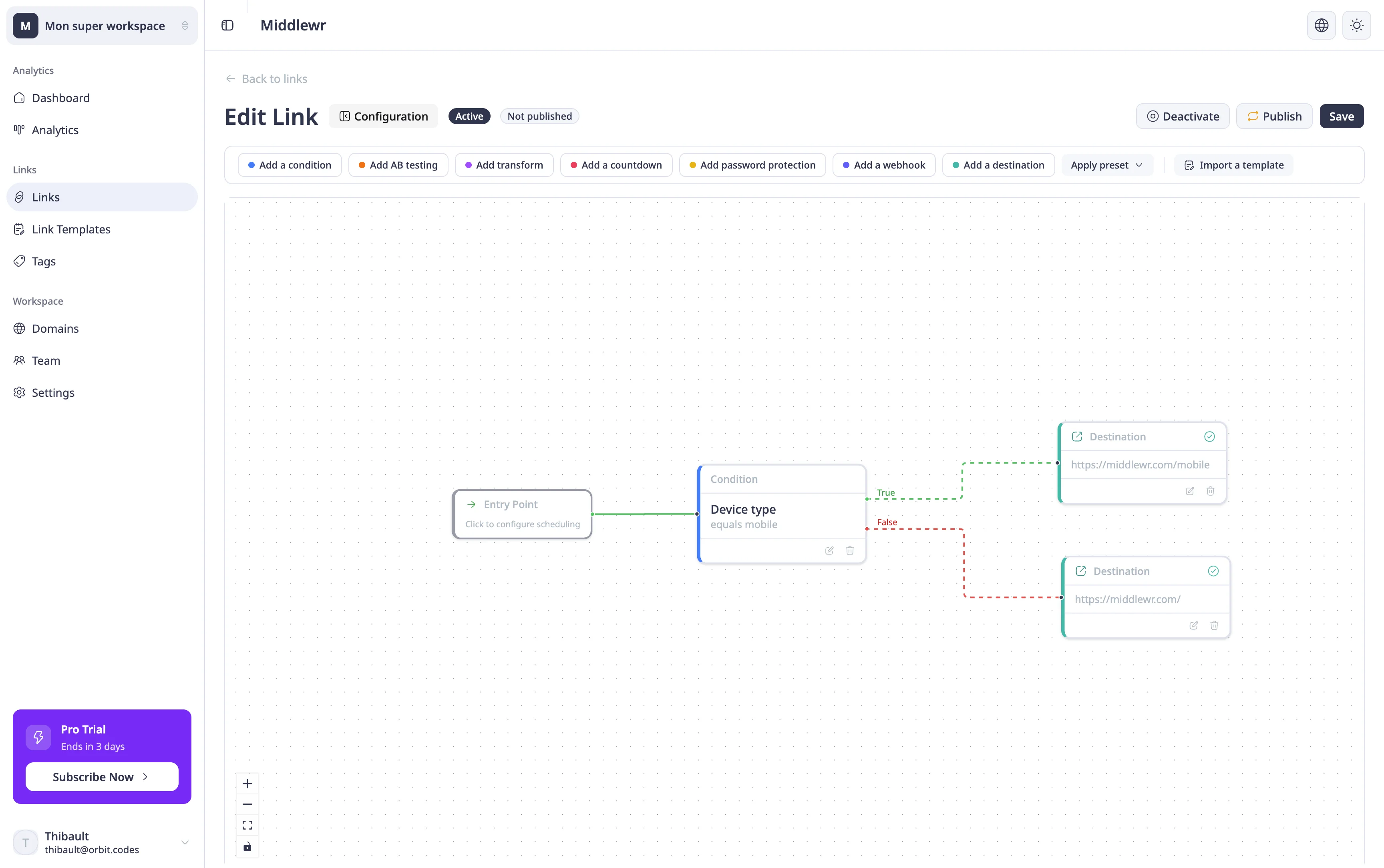
Middlewr's visual rule graph editor allows you to build multi-path redirect logic without writing a single line of code. You connect nodes in a flowchart-style canvas to create sophisticated routing rules. The available node types include:
- Entry — the starting point with scheduling and fallback URL configuration
- Condition — branch based on device type, country, language, browser, or custom headers
- Destination — the target URL with redirect status code selection (301 or 302)
- Split — distribute traffic across multiple paths with weighted percentages
- Transform — modify the request before forwarding (add headers, rewrite paths)
- Password — require a password before granting access
- Countdown — display a countdown timer before redirecting
- Webhook — trigger an external service when the link is clicked
With these building blocks, you can handle use cases that would require multiple tools — or custom development — with Bitly. Want to send mobile users to your app store listing, German visitors to your DE landing page, and everyone else to your English homepage? That is a single link in Middlewr with three nodes connected together.
Bitly has no equivalent feature. If you need conditional redirects with Bitly, you would need to create separate links for each audience segment and manage the routing logic yourself, typically through your website's server-side code or a third-party tool.
Modern UX vs. an Aging Interface
Middlewr was built from the ground up with a modern tech stack and a focus on user experience. The interface is clean, responsive, and fast. The rule graph editor uses an interactive canvas that makes complex routing logic intuitive to build and easy to understand at a glance.
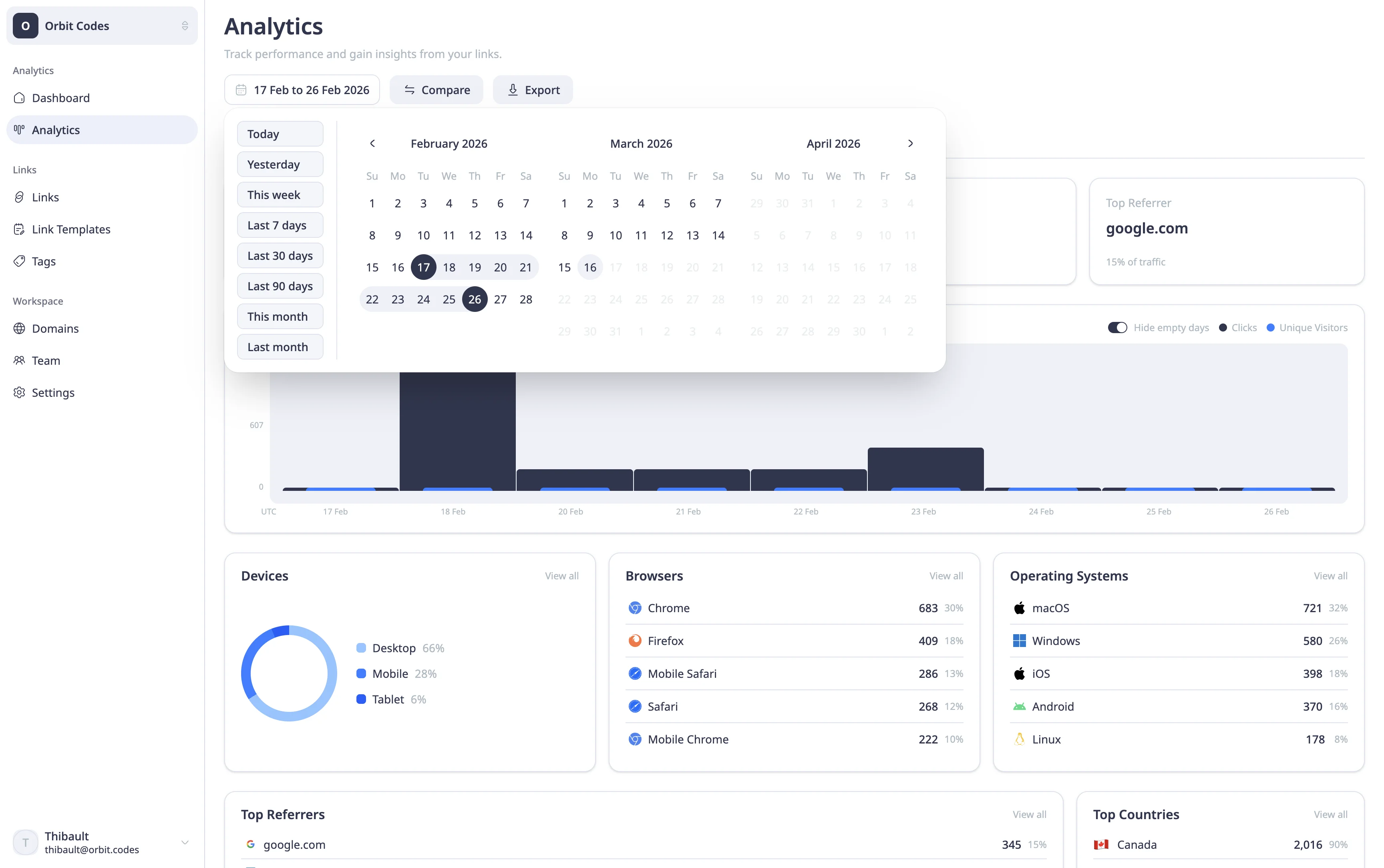
Bitly's interface, while functional, has not kept pace with modern design standards. The dashboard can feel cluttered, and performing advanced operations often requires navigating through multiple screens. For teams that spend significant time managing links, the day-to-day experience matters — and a more intuitive interface translates to faster workflows and fewer mistakes.
Middlewr also supports workspaces with role-based permissions, making it straightforward to organize links by project or client and control who can do what. While Bitly offers team features, they are locked behind its more expensive plans and provide less fine-grained control.
Pricing and Free Plan
Bitly has become notably expensive over the years, and its free plan has been progressively reduced. As of 2026, Bitly's free tier allows a very limited number of links per month and restricts access to analytics history. Paid plans start at a price point that can be difficult to justify for small teams or individual creators.
Middlewr takes a different approach with a free plan that gives you access to the full feature set — every capability is included, with limits on tracked links and analytics retention. Conditional routing, QR codes, analytics, custom domains, API access, and team collaboration are all available from day one. Paid plans scale competitively, and pricing is transparent without hidden per-click fees. For teams comparing the cost of both platforms at similar usage levels, Middlewr typically comes in at a fraction of Bitly's price.
Advanced Features Bitly Does Not Offer
Beyond conditional routing, Middlewr includes several capabilities that Bitly simply does not have:
A/B Testing with Split Routing
Middlewr's split routing feature lets you run A/B tests natively. Create a split node in the rule graph, assign percentage weights to each variant, and Middlewr distributes traffic at the edge with zero latency overhead. You can test two landing pages, three CTA variations, or any number of destinations — all from a single short link. No third-party tools, no code changes.
Link Templates
If you create links with similar settings repeatedly — same UTM parameters, same routing rules, same domain — link templates let you save that configuration and apply it to new links with one click. This eliminates repetitive setup and ensures consistency across campaigns. Bitly does not offer reusable templates.
Customizable QR Codes
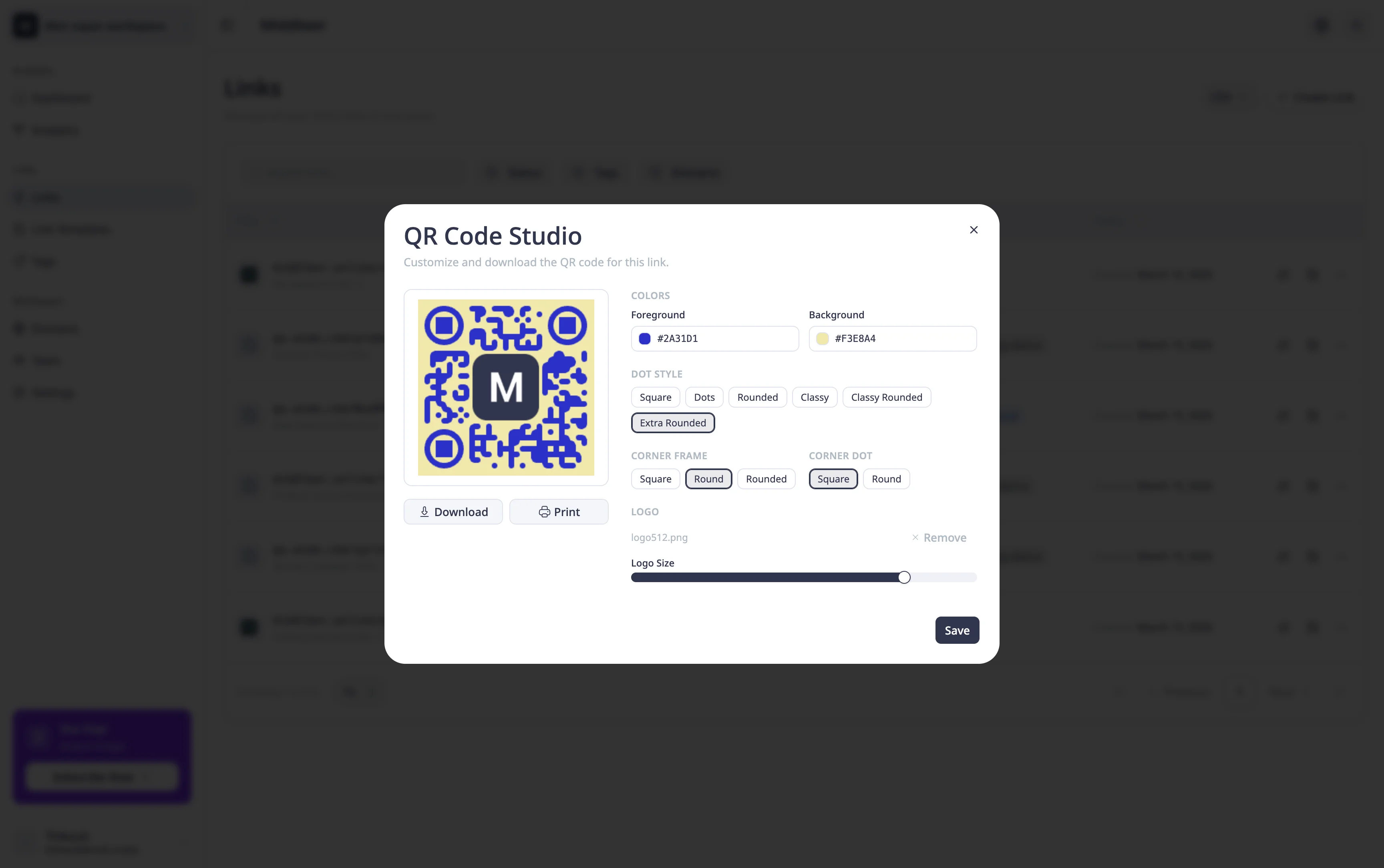
Both platforms generate QR codes, but Middlewr gives you significantly more control over the output. You can customize colors, add your logo, and adjust the style to match your branding. See the QR code guide for the full range of options. Bitly's QR codes are more basic and offer limited customization on free plans.
Webhooks and Programmatic Triggers
The Webhook node type in the rule graph lets you trigger external services when a link is clicked. This opens up integrations with CRMs, analytics platforms, Slack notifications, or any system that accepts HTTP requests — without building custom middleware.
CSV Import and Export
Moving to a new platform or managing links in bulk? Middlewr supports CSV import and export, making it easy to migrate existing links or manage large link inventories outside the UI.
Who Is Each Tool For?
Choose Bitly if:
- You need a simple, proven link shortener with minimal configuration
- Brand recognition matters — stakeholders know and trust the Bitly name
- You only need basic click analytics and a single destination per link
- You are already deeply integrated into Bitly's ecosystem and migration cost is prohibitive
Choose Middlewr if:
- You need conditional routing to serve different audiences from a single link
- You want A/B testing capabilities built into your link management
- You need customizable QR codes that match your brand
- You want a modern, fast interface with workspaces and role-based access
- Budget matters — you need competitive pricing without sacrificing features
- You want advanced capabilities like link templates, webhooks, and CSV workflows
Conclusion
Bitly earned its place as the default link shortener, and it remains a reliable choice for basic use cases. But the link management landscape has moved forward. If your needs go beyond simple URL shortening — if you want to route traffic intelligently, test destinations, customize QR codes, or collaborate with a team without paying a premium — Middlewr offers a more complete and cost-effective solution.
The best way to decide is to try both. Middlewr's free plan gives you access to the full feature set, so you can evaluate conditional routing, split testing, and the rest of the platform without any commitment.