Manage Billing and Plans

Middlewr includes every feature on every plan — routing rules, analytics, QR codes, custom domains, API, and team collaboration. What changes between plans is the number of tracked links and how long your analytics data is retained. This guide shows you how to view your current plan, start a free trial, and manage your subscription.
Prerequisites
Before you begin, make sure you have:
- A Middlewr account
- The Admin role on the workspace (billing is restricted to admins)
Understanding the plans
Every new workspace starts on the Free plan. All plans share the same features — the difference is in capacity:
| Free | Developer | Pro | Business | |
|---|---|---|---|---|
| Price | $0 | $25/mo | $100/mo | Custom |
| Tracked links | 25 | 1,000 | Unlimited | Unlimited |
| Analytics retention | 30 days | 1 year | Unlimited | Unlimited |
| Features | All included | All included | All included | All included |
| Support | Community | Community | Community | Priority + Slack Connect + Dedicated manager |
Yearly billing is available for Developer and Pro and saves one month (Developer: $275/year, Pro: $1,100/year).
Free trial: Every workspace gets a 7-day free trial of the Pro plan — unlimited tracked links and unlimited analytics retention, no credit card required. Try everything before you commit.
Upgrading your plan
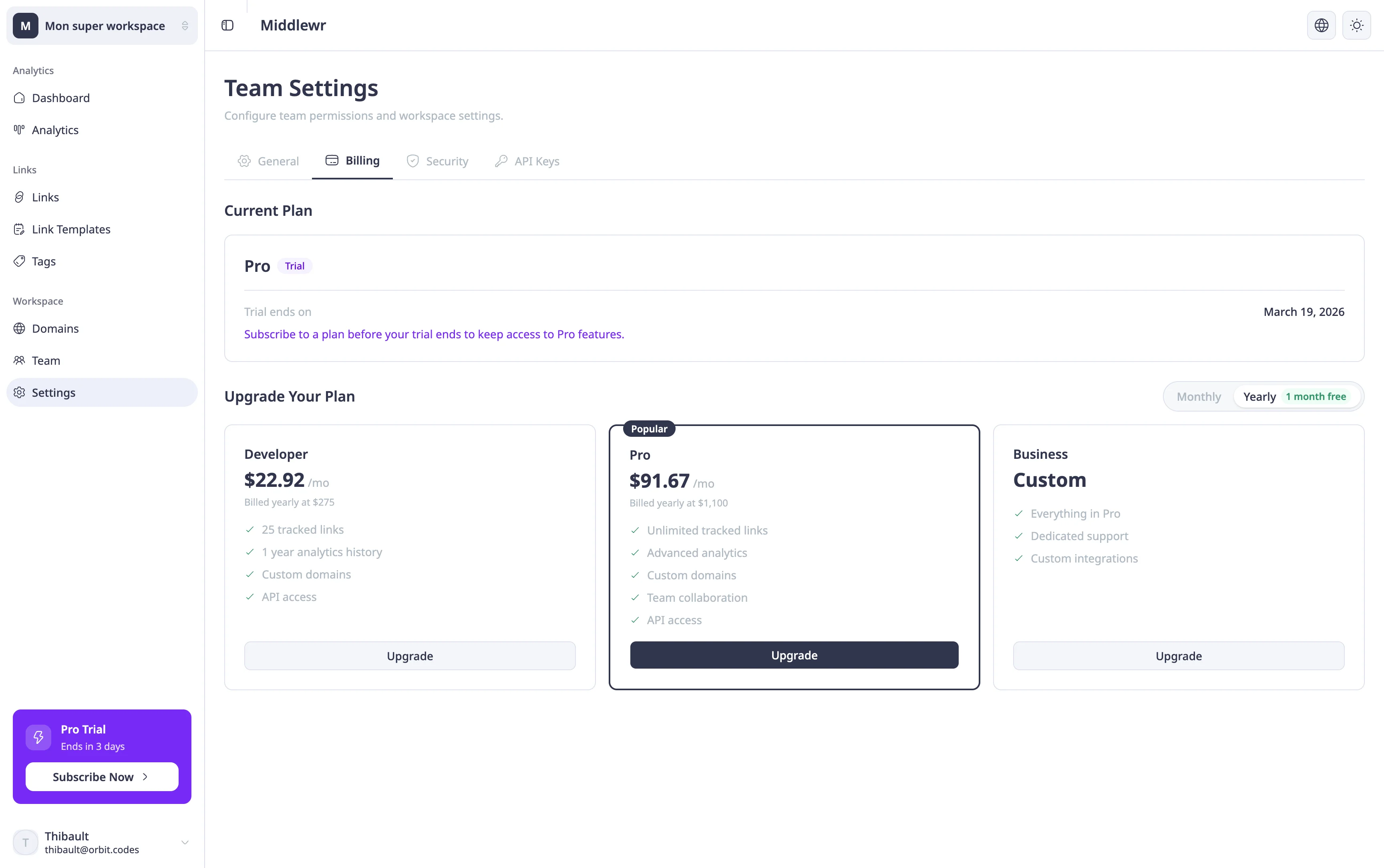
Go to Settings from the sidebar, then click the Billing tab. You'll see your current plan and the available upgrade options.
Click Upgrade on the plan you want. You'll be redirected to a secure Stripe checkout page. Once payment is confirmed, your workspace immediately reflects the new plan's limits.
If you're still on the free trial, upgrading before it ends transitions you seamlessly to the paid plan.
Managing an existing subscription
Once on a paid plan, the Billing page shows a Manage Subscription button that opens the Stripe customer portal. From there you can:
- Update your payment method — change the card on file
- Switch plans — upgrade or downgrade between paid tiers
- View invoices — download past invoices for accounting
- Cancel — your plan stays active until the end of the current billing period
Going further
- Invite and manage team members — add collaborators to your workspace as your team grows
- Create and manage API keys — automate link management with the API, available on all plans
- Understand your analytics dashboard — upgrading extends analytics retention for deeper historical analysis