Middlewr vs Dub.co: Which Link Shortener Is Right for You?

The link shortener market has evolved well beyond simple URL compression. Modern platforms like Middlewr and Dub.co offer analytics, custom domains, team collaboration, and developer-friendly APIs. But when it comes to advanced routing logic, traffic management, and customization depth, the two platforms diverge significantly.
This comparison breaks down the key differences to help you decide which tool fits your workflow best.
Overview of Both Platforms
Middlewr is a link management platform built around a visual rule graph editor. Every short link can have a multi-step routing flow — conditions, splits, transforms, password gates, countdowns, and webhooks — all configured through a drag-and-drop graph interface. It is designed for marketers, product teams, and developers who need precise control over where their traffic goes and why.
Dub.co is an open-source link management tool focused on clean design and developer experience. It provides link shortening, basic analytics, custom domains, and a well-documented API. Dub.co positions itself as a modern alternative to Bitly with a strong emphasis on simplicity and open-source transparency.
Both platforms are modern, well-built, and actively maintained. The choice between them depends on what you need your links to do beyond basic shortening.
Feature Comparison
| Feature | Middlewr | Dub.co |
|---|---|---|
| Conditional routing | Visual rule graph editor with 8 node types | Basic device/geo targeting |
| Analytics | Real-time dashboard with country, device, referrer, browser breakdown | Click analytics with similar breakdowns |
| Custom domains | Unlimited custom domains | Custom domains (plan-dependent limits) |
| QR codes | Fully customizable (colors, logo, patterns, formats) | Basic QR code generation |
| A/B testing | Built-in split routing with weighted traffic distribution | Not natively supported |
| API | RESTful API with full CRUD and key management | Comprehensive REST API |
| Team collaboration | Workspaces with role-based permissions | Team workspaces |
| Link templates | Reusable templates with preset configurations | Not available |
| CSV import/export | Full import and export support | CSV import |
| UTM tracking | Built-in UTM builder with parameter management | UTM builder available |
| Password protection | Password gate node in routing graph | Link-level password protection |
| Webhooks | Webhook node triggers external services on redirect | Webhook events via API |
Deep Dive: Conditional Routing
This is where Middlewr and Dub.co differ most fundamentally.
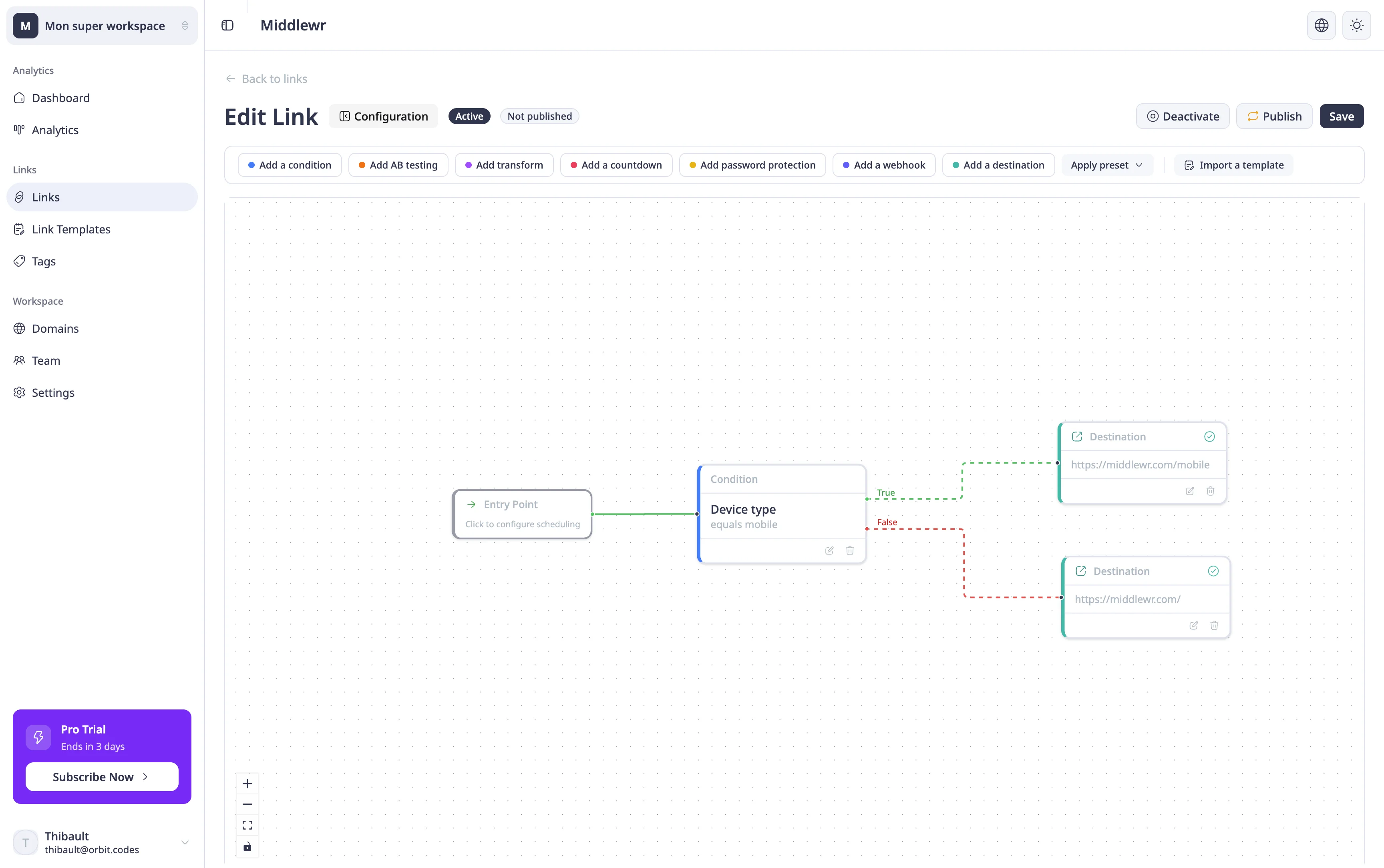
Middlewr's Visual Rule Graph Editor
Middlewr treats every short link as a programmable routing pipeline. When you open a link's detail page, you get a visual graph editor where you build redirect logic by connecting nodes. This is not a simple "if device is mobile, go here" toggle — it is a full flow editor with eight distinct node types:
- Entry — the starting point, with optional scheduling and a fallback URL
- Condition — branch based on device type, country, language, browser, OS, or any HTTP header
- Destination — the final redirect target with configurable status codes (301/302)
- Split — distribute traffic across multiple destinations by weight for A/B testing
- Transform — modify the redirect by appending query parameters, overriding status codes, or injecting headers
- Password — require visitors to enter a password before proceeding
- Countdown — display a timer overlay before the redirect fires
- Webhook — fire an HTTP request to an external service at redirect time
These nodes can be chained together in any combination. For example, you could build a flow that checks if a visitor is on mobile, then checks their country, then splits traffic 70/30 between two landing pages — all within a single short link. The graph validates in real time, highlighting missing connections or configuration errors before you publish.
For a hands-on walkthrough, see Conditional routing: how to set up smart redirects.
Dub.co's Approach
Dub.co offers device targeting and geo-targeting at the link level. You can set different destinations for mobile vs. desktop, or for specific countries. This covers the most common use cases — sending iOS users to the App Store and Android users to Google Play, for instance — but it does not support chaining multiple conditions, weighted traffic splits, or the more advanced node types that Middlewr provides.
If your routing needs are straightforward, Dub.co's approach is clean and simple. If you need multi-step logic, A/B testing, or programmatic transforms within the redirect flow, Middlewr's graph editor gives you significantly more flexibility.
Deep Dive: Analytics
Both platforms provide click analytics with geographic, device, and referrer breakdowns. Middlewr's analytics dashboard shows real-time data including country, city, device type, browser, operating system, and referrer source. You can filter by date range and view trends over time.
Dub.co offers a similar analytics feature set with a polished interface. Both platforms track clicks at the edge for fast performance.
The practical difference is in how analytics data integrates with routing decisions. In Middlewr, analytics data can inform how you configure your rule graph — for example, if analytics show 60% of your traffic comes from Germany, you might add a condition node routing German visitors to a localized page. This feedback loop between analytics and routing is tighter because both features live in the same visual workspace.
Deep Dive: QR Codes
QR codes have become a core part of link management, connecting offline materials (print, packaging, signage) to digital destinations.
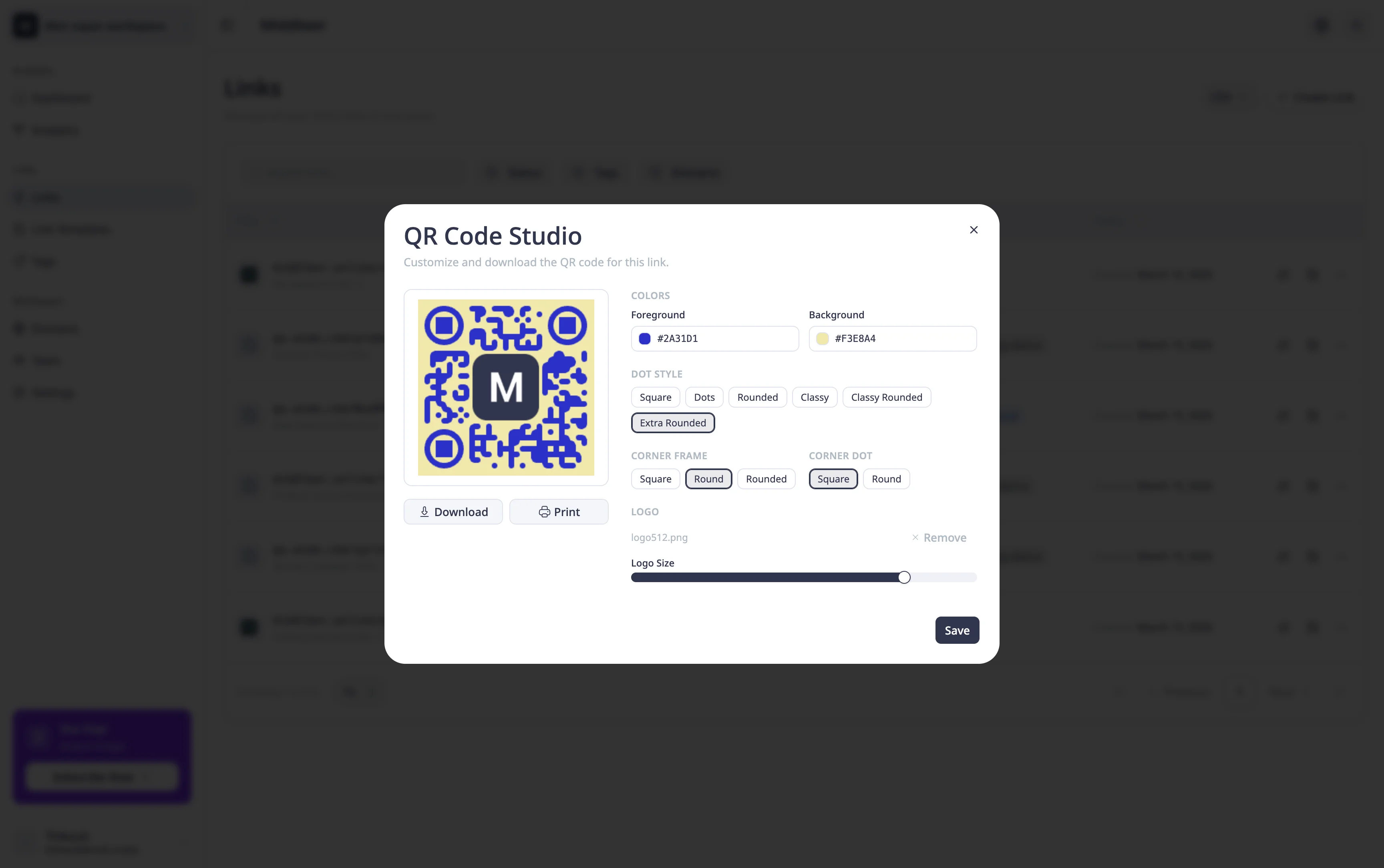
Middlewr offers full QR code customization. You can change colors, add your logo to the center, select from different dot patterns and corner styles, and export in multiple formats (PNG, SVG). This means your QR codes can match your brand identity rather than defaulting to generic black-and-white squares. See Generate and customize QR codes for a step-by-step guide.
Dub.co provides QR code generation for your short links, but with more limited customization options. If brand-consistent QR codes are important for your print materials or product packaging, Middlewr gives you more control.
Deep Dive: A/B Testing
Running A/B tests on landing pages typically requires either a dedicated experimentation platform or custom server-side logic. Middlewr builds this capability directly into the link layer with split routing.
A split node in Middlewr's rule graph lets you define two or more destination URLs with configurable traffic weights. You set a 50/50 split for a standard A/B test, or 80/20 for a more conservative rollout. Combined with UTM tracking, you can attribute conversions per variant in your analytics tool of choice.
For a complete setup guide, see A/B testing with split routing.
Dub.co does not offer native A/B testing or split routing. To run a similar test with Dub.co, you would need to handle traffic distribution externally — through your application code, a CDN, or a third-party experimentation tool.
Deep Dive: Pricing
Both platforms offer free tiers and paid plans. Middlewr's free plan includes core features like conditional routing, analytics, QR codes, and team collaboration with limited usage. Paid plans increase limits on links, tracked clicks, custom domains, and team members.
Dub.co's free tier covers basic link shortening and analytics. Paid plans unlock higher limits and additional features like advanced analytics and more custom domains.
The key pricing difference is in what you get for free. Middlewr includes its full routing engine — all eight node types, the visual graph editor, and split testing — on every plan. You are paying for volume (more links, more clicks, more domains), not for access to core features. Dub.co gates some advanced features behind higher-tier plans.
Who Is Each Tool For?
Choose Middlewr if you:
- Need advanced conditional routing with multi-step logic
- Want to run A/B tests directly at the link level without external tools
- Require fully branded QR codes for print or packaging
- Use link templates to standardize link creation across your team
- Need to chain conditions, transforms, and webhooks in a single redirect flow
- Want a visual editor rather than writing routing rules as code or config
Choose Dub.co if you:
- Want a simple, clean link shortener with solid analytics
- Value open-source transparency and want to self-host
- Primarily need basic device or geo targeting
- Prefer a developer-first API experience with minimal UI complexity
- Have straightforward routing needs without multi-step logic
Conclusion
Middlewr and Dub.co are both capable link management platforms, but they serve different levels of routing complexity. Dub.co excels as a clean, developer-friendly shortener with good analytics and a strong open-source foundation. Middlewr goes further by turning every short link into a programmable routing pipeline — with a visual graph editor, split testing, transform nodes, and advanced gating options that let you control exactly how traffic flows through your links.
If your use case involves any form of conditional logic, traffic splitting, or multi-step redirect flows, Middlewr's rule graph editor is a capability you will not find in most competing tools. If you want straightforward shortening with a polished interface, Dub.co is a solid choice.
The best way to decide is to try both. Create a free account on Middlewr, build a routing graph for one of your links, and see if the added flexibility changes how you think about link management.